
Track the game.
Get the reel.
You watch the game. You tap the plays. HITTER films it and cuts the reel. You get a captioned highlight reel of your hitter, on your iPhone, the moment the game ends. Every tap is a stat, too. No editing, no upload, no subscription.
The 3-minute tour
Tap a play. The reel builds itself.
See HITTER from the first tap to the finished reel: setup, tracking, the highlight studio, and what to do before your first game.
Also on YouTube, with chapters.
How it works
From sideline taps to a highlight reel — automatically.
Film
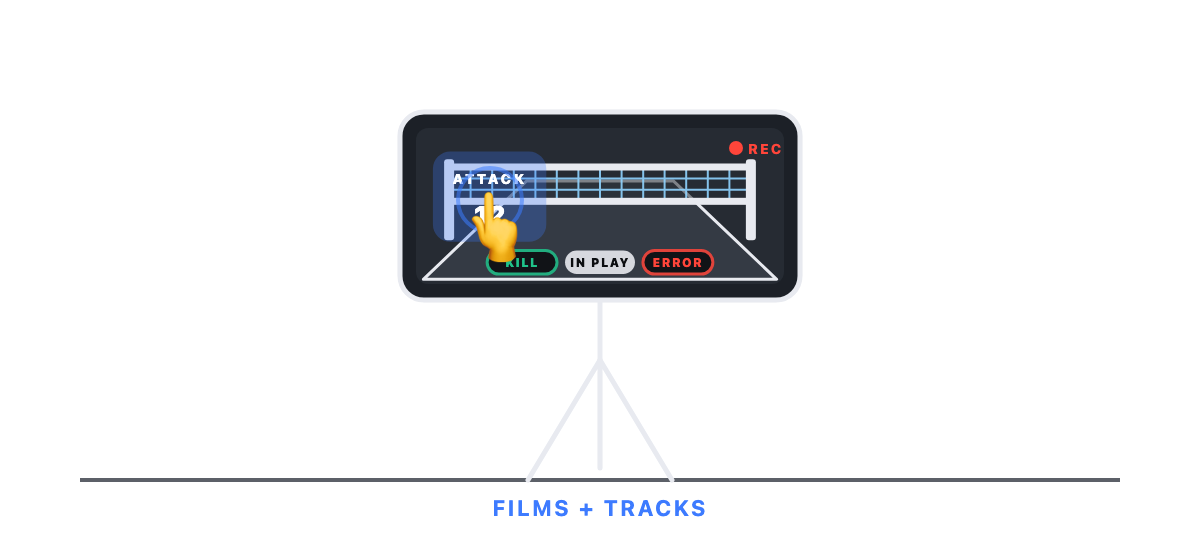
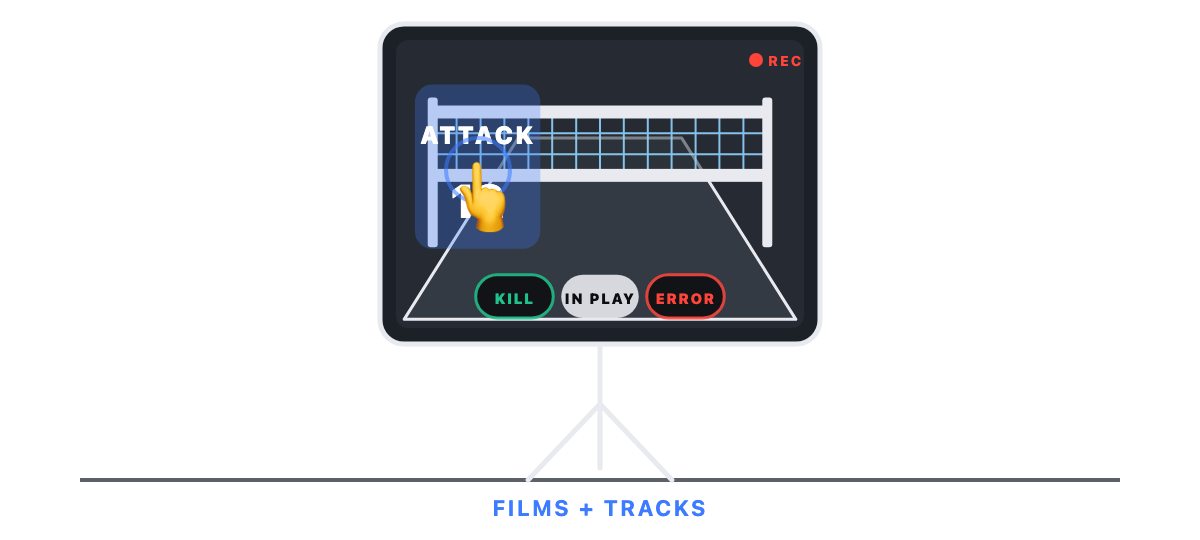
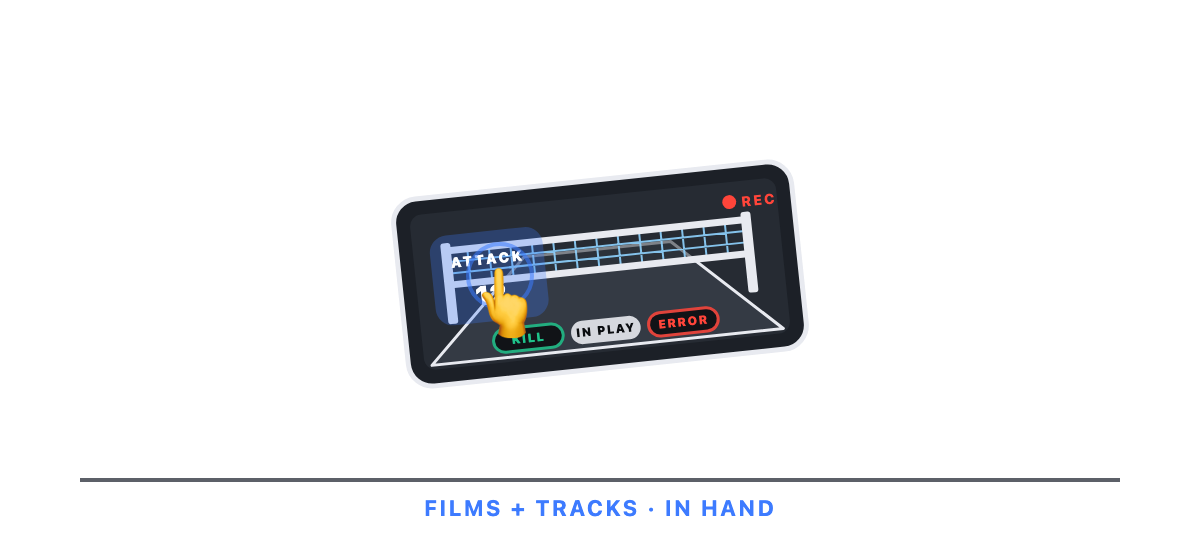
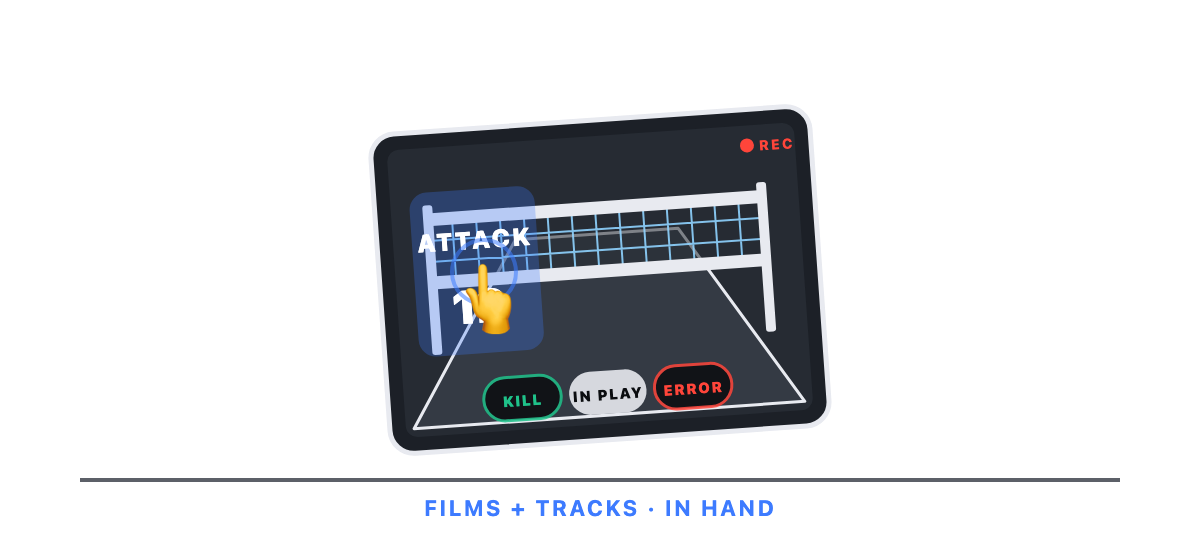
Start a game and tap START FILMING. HITTER records while you track — from your hand, or from a tripod with the play buttons over the picture. (A second iPhone or iPad with the Camera app works too.)
Track
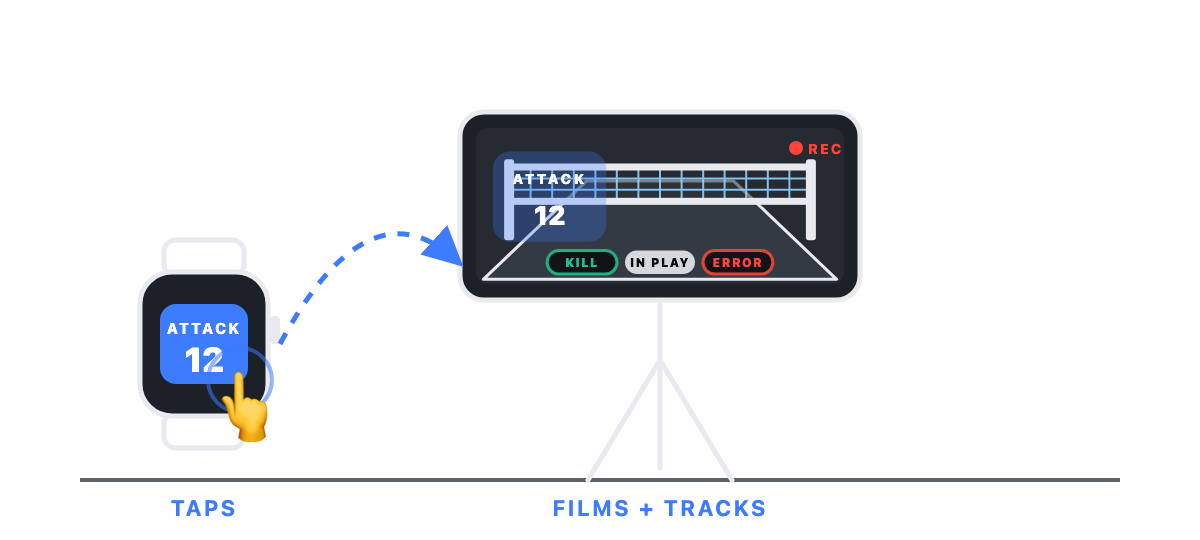
Tap once per play as you watch the game. Track attacks always, and add blocks and serves if you want. Mark the big ones Kill or Error. Wearing an Apple Watch? Tap from your wrist while the phone films from the tripod.
Get your reel
Tap END GAME. Every play is already linked to the footage and saved to Photos. Your captioned highlight reel is ready — share it in one tap.
The more timely your taps, the tighter your reel. That's the whole trick.
Video Highlights — the flagship
A real highlight reel, from the video you already shot.
No editor, no upload, no waiting on a service. HITTER automatically clips every play you tapped — kills, blocks, serves, and the moments you mark — and stitches them into a single reel with a clean intro card, per-clip captions, and your hitter's name and number. Preview each clip, reorder them, nudge each clip's start, set the reel's clip length, and export — landscape, vertical, or square, sized for any feed. Share it to Messages, social, or a recruiting coordinator in one tap.
- Auto-clipped from your timestamps — every play you tapped becomes a clip.
- You frame your athlete — your footage is already centered on your hitter.
- Built on-device in seconds — no cloud queue, no upload.
- Unlimited reels — one game or a whole season, as many times as you like.
- Even better on iPad — review and fine-tune in a big-screen, two-pane studio.
- Spotlight your athlete — mark them in a clip and a ring lights them up the moment they hit, so the eye goes straight to your player. (Pro)
An actual reel built by HITTER. Demo footage.
Shrink game film
A 12 GB game becomes a couple hundred megabytes.
A full game recording eats gigabytes. HITTER turns it into one small video of just the plays you keep, then offers to delete the original so you reclaim the space. Every play stays editable and reel-ready after the big file is gone.
- Free — no Pro required.
- Keeps every play — your clips, favorites and reels all still work.
- You decide — HITTER offers to delete the original; it never does it on its own.
Greatest Hits
Their best plays, from every game, in one reel.
Favorite your player’s best plays — in the clip list or right in the reel player — and HITTER assembles them into one cross-game reel: their greatest hits, literally. Build it from every favorite they’ve earned or just a date range, with per-game captions and a clean closing card. (Pro)
HITTER Pack
Hand your athlete their whole season.
You tracked it from the sideline and filmed it from the tripod — but it’s their season. Package the player into a HITTER Pack: their stats and the clips you kept, in one file. Send it, and they have the whole year on their own device — every game, every favorite — ready to build and share highlights on their own. It’s also the simplest way to hand a season to a player you coached, or to move a player to a new device.
- They take it from here — your athlete builds and shares their own reels, on their device, on their schedule.
- No shared account — no cloud to invite anyone into. Just the player, handed over.
- Free to send. And if you’ve unlocked Pro, Apple Family Sharing covers your athlete too — so Greatest Hits and watermark-free reels travel with them.
New in 2.0
HITTER now films the game. All you need is an iPhone.
Start a game, tap START FILMING, and HITTER records while you track. Every play you tap becomes a clip, saved to Photos during the game, and your reel is ready the moment you tap END GAME. A second device is not required, but it works great if you have one.
- One device does the whole job — the play buttons sit over the viewfinder, and you tap exactly as you do if you aren't filming in HITTER.
- Apple Watch — your wrist is the remote. Put the phone on a tripod and tap plays from anywhere in the gym: one tap per play, mark kills and errors, control filming. Out of range? Taps wait on the watch and sync when you're back.
- Standby — player on the bench? Tap STANDBY. The camera keeps rolling, and when you tap a play, up to the last 15 seconds are kept.
- Calls happen — answer a call mid-game and filming picks itself back up.
- Still one tap — blocks, serves, and moments are optional, live score on your lock screen, and player headshots on the reel's intro and outro cards.
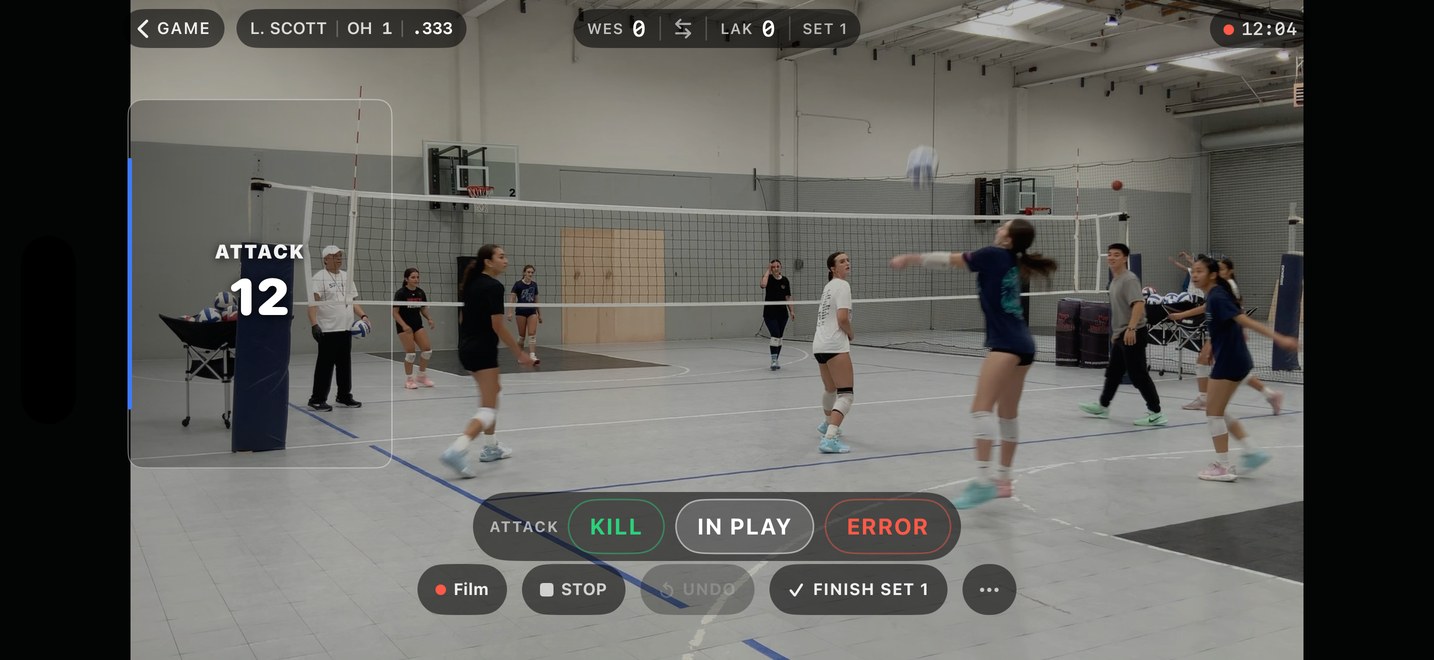
Demo footage.
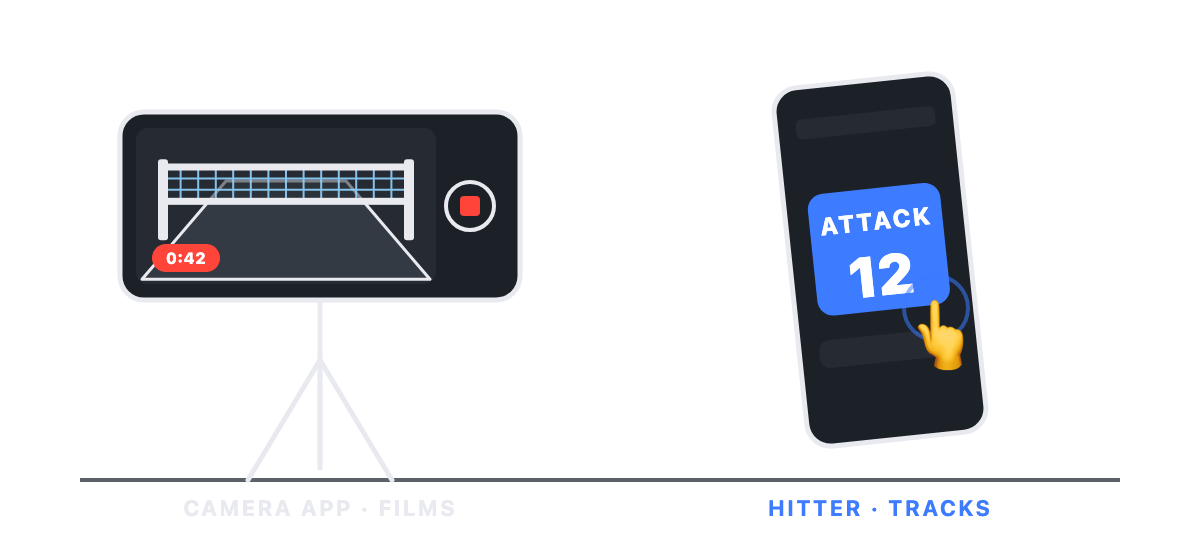
Six ways to set up at a game — they all make the same reel.
The stat that matters
The number that separates good hitters from great — finally easy to track.
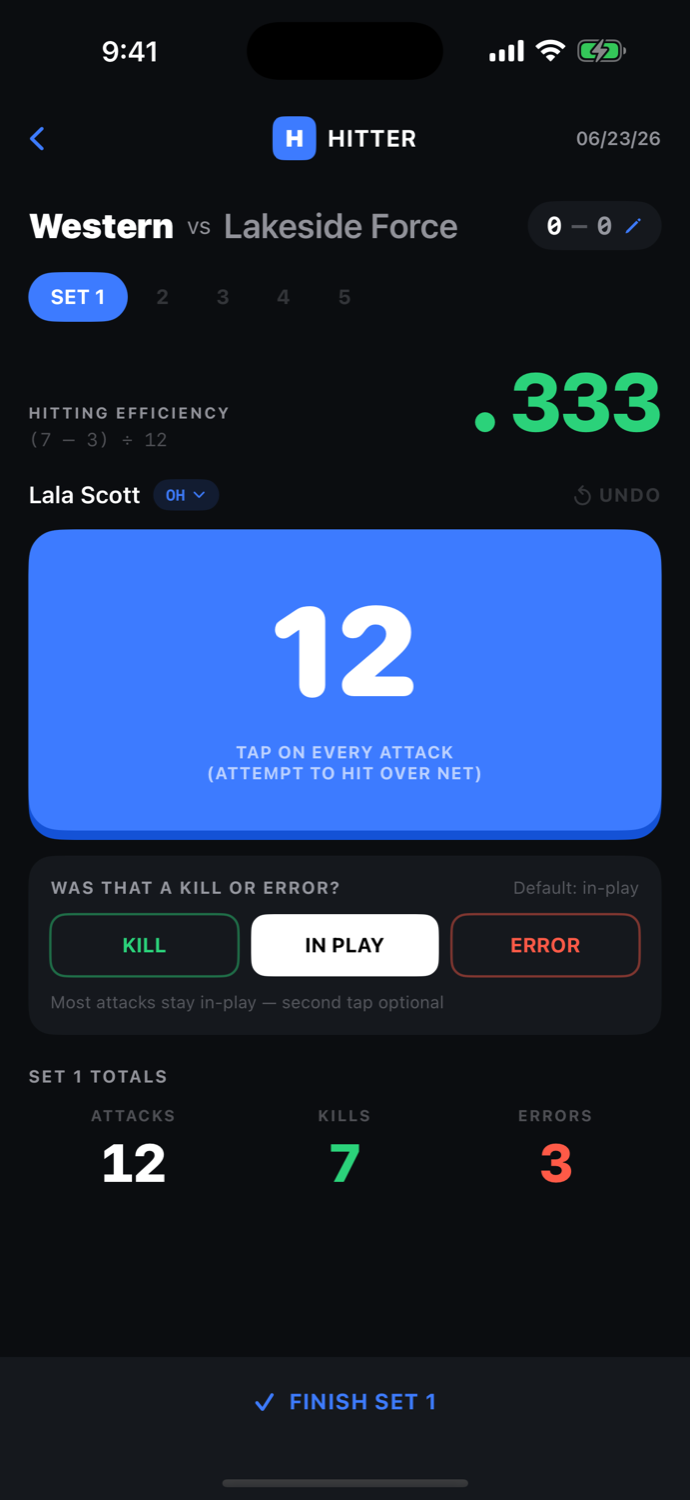
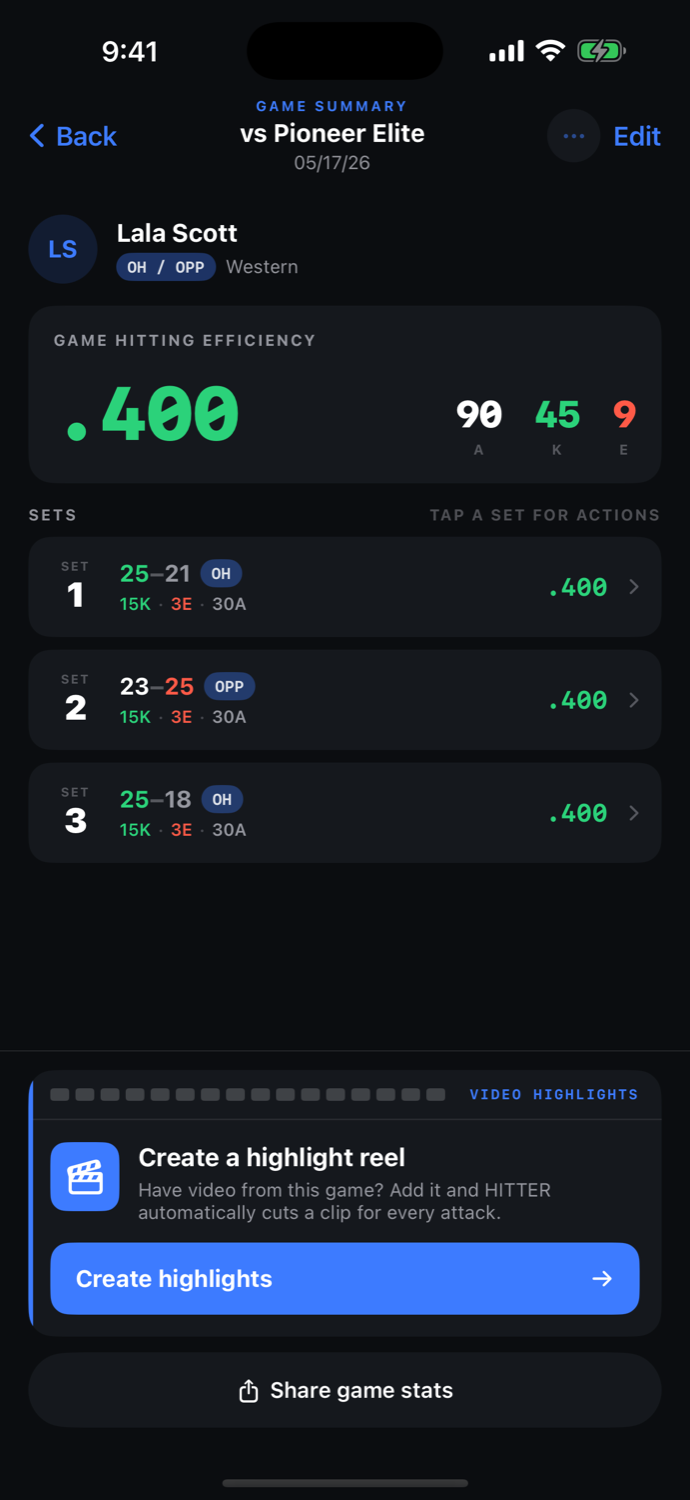
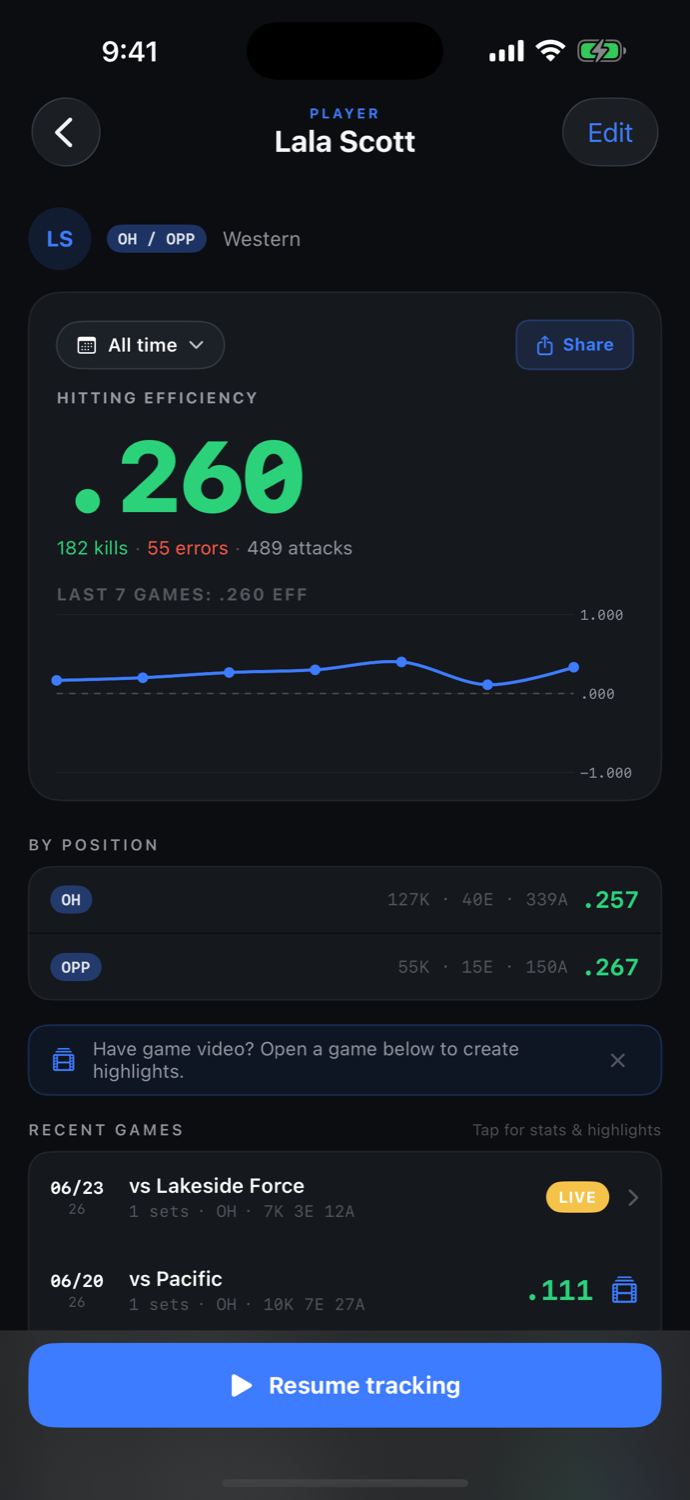
For hitters, hitting efficiency — (Kills − Errors) ÷ Attacks — measures how well your hitter actually swings, not just how often. It rewards putting the ball away and punishes errors, which kills-alone never shows. Never tracked before? You don't need a clipboard or a spreadsheet — just tap once per attack and HITTER does the math live, per set, per game, and over time. See the trend across the year, break it down by position, and share a branded stat card after any set or game.
- Live per-set and per-game efficiency
- Year and all-time trends and totals
- Per-position breakdown (OH / OPP / MB)
- Branded set, game, and year/all-time share cards
New to tracking? This is the easiest place to start — and the hitting stat most worth tracking.
You're in control
No coach required. No subscription. No waiting.
Even if your team already has a film platform, you know the frustrations: you wait on someone else to film and upload, on their schedule — and the whole-court footage barely shows your hitter. HITTER flips that. You point your own camera at your own kid, track as you watch, and build a reel centered on them the moment the set ends — on your own device, no upload queue, no annual bill. It doesn't replace your team's platform; it's the one that's actually about your hitter. Buy it once; it's yours.
| HITTER | Team platforms | Reel editing services | |
|---|---|---|---|
| Cost | Free; Pro is a one-time purchase | $1,250–$2,000/yr | $149–$199 per reel |
| Who controls it | You | The club / coach | The editor |
| Reel turnaround | Seconds, on-device | Varies | Days |
| Built for your hitter | Yes | Whole team | Whatever you send |
iPhone & iPad
Track on your phone. Build it big on iPad.
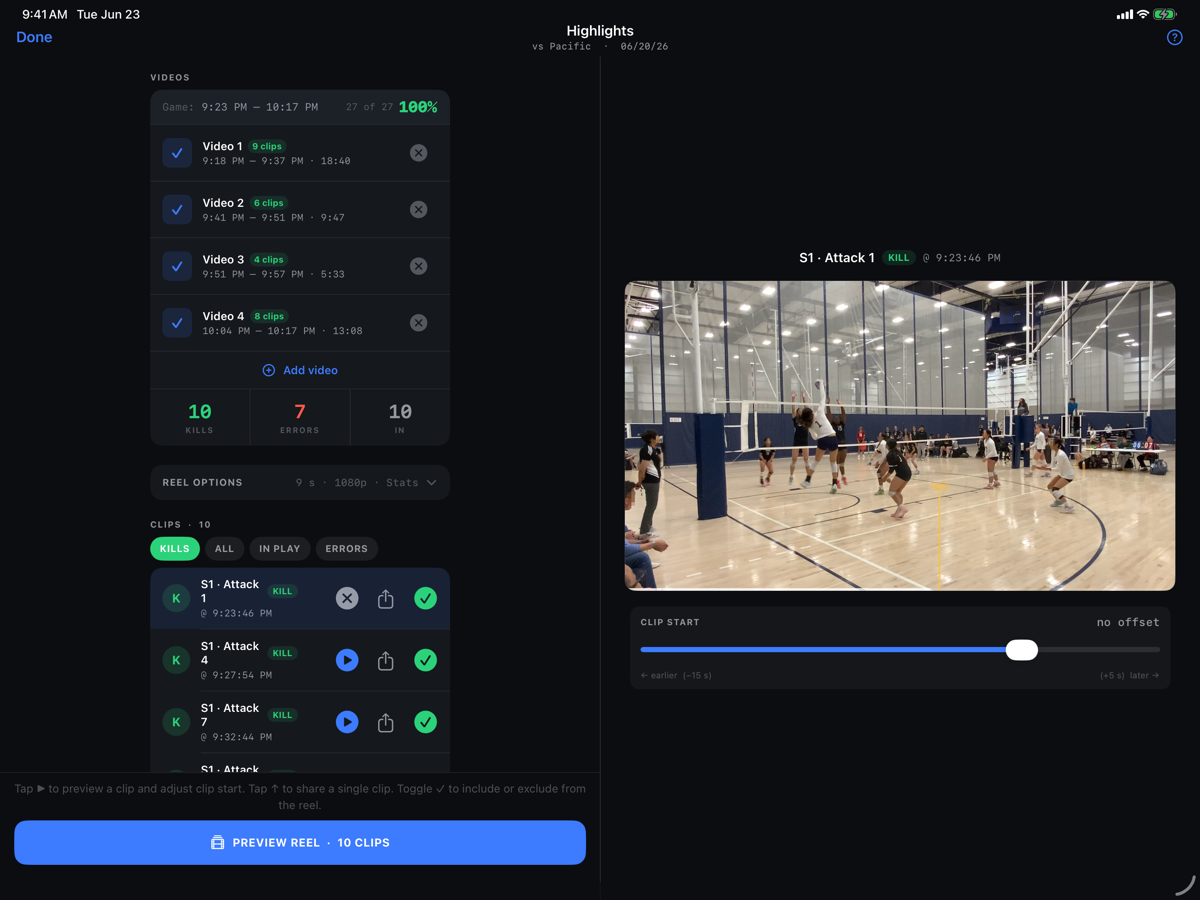
One device films and tracks — an iPhone in your hand, or an iPad on a tripod for a wide, steady shot. Have both? Film with the Camera app on one and track in HITTER on the other; signed into the same Apple Account, your tracking syncs to where the video is. And on iPad, building the reel is genuinely better: a full-screen, two-pane Highlights studio puts your entire clip list beside a large preview, so you can scrub, nudge the timing, and perfect every clip at a glance.
- Two-pane Highlights studio on iPad — your clip list and a big preview, side by side.
- Review on the big screen — full-screen reel and clip playback for spotting the perfect moment.
- One app, every device — track on iPhone, build on iPad; it all syncs over iCloud.
Free & Pro
Free to start. Pro when you're ready.
Free
Everything you need to track and try highlights.
- Track one player
- Film the game in HITTER while you track — one device does both
- Apple Watch — tap plays from your wrist
- Live hitting efficiency, per set & per game
- Game summary + set, game & year/all-time share cards
- Last-5-games trend chart
- Video highlight reels & clips — with a HITTER watermark
- Shrink game film — reclaim gigabytes, keep every play
- Send a HITTER Pack — hand a whole player to another device
Pro
Everything in Free, plus:
- Watermark-free reels & clips — clean and recruiting-ready
- Unlimited players — add siblings and teammates (you track one at a time)
- Full trend chart — every game, not just the last 5
- Per-position breakdown (OH / OPP / MB)
- Greatest Hits — favorites from every game in one cross-game reel
- Spotlight — a ring marks your athlete the moment they hit
One-time purchase — no subscription — and one purchase covers your whole family via Apple Family Sharing. Try the highlights free; when you're ready to send a reel to a coach, Pro gives you the clean version.
FAQ
Questions, answered.
What is “shrink game film”?
A full game recording is huge. HITTER rebuilds it as one small video containing just the plays you kept, then offers to delete the original so you get the space back — a 12 GB game becomes a couple hundred megabytes. Your plays stay editable and reel-ready afterwards. It’s free.
Can I give a player to someone else?
Yes — send a HITTER Pack. It bundles that player’s stats and the clips you kept into one file; whoever opens it has the player on their own device, ready to build reels. It’s a great way to hand a season to the athlete themselves. Free, and there’s no shared account or cloud to invite anyone into.
What’s a Greatest Hits reel?
Favorite plays across any number of games and HITTER stitches them into a single cross-game reel — the whole season, or any date range, with per-game captions and a closing card. (Pro)
How do I create a highlight reel?
- Start a game in HITTER and tap START FILMING. Hold the phone, or put it on a tripod — the play buttons sit over the picture.
- Tap once per play as you watch. Wearing an Apple Watch? Tap from your wrist.
- Tap END GAME. Every play is linked to the footage and saved to Photos. Open the game and tap Create highlights — HITTER cuts a clip for every play you tapped, and PREVIEW REEL puts them together.
Filming on a second iPhone or iPad instead? Record in landscape with the built-in Camera app, keep both devices on the same Apple Account, and build the reel on the device that has the video. (Or AirDrop the footage over.)
Do I need two devices to make a reel?
No. HITTER films the game itself while you tap the plays — one device does the whole job. Two devices still work well: one films with the Camera app, the other runs HITTER. Just tracking stats? One device, always.
Can I tap plays from my Apple Watch?
Yes. Open HITTER on your watch while a game is live on your iPhone. The watch shows the same big buttons — ATTACK, plus BLOCK and SERVE if you track them — and lets you mark kills and errors, and put filming in standby. Taps reach the phone at once, so the phone can sit on the tripod filming. Out of range for a moment? The watch keeps your taps and sends them when you're back. The HITTER watch app installs with the phone app.
We've never tracked stats — is HITTER for us?
Yes — it's the easiest place to start. Hitting efficiency is the number that separates good hitters from great, and HITTER tracks it with a single tap per attack. No clipboard, no spreadsheet, no math.
Our team already has Hudl — why HITTER?
Because Hudl films the whole court on someone else's schedule, and you're left waiting on an upload and squinting to find your kid. HITTER is your hitter's own footage, framed on them, turned into a reel automatically — on your timeline. It complements your team's platform; it doesn't replace it.
How is HITTER different from BallerTV or Sporfie?
Those are live-streaming and tournament-coverage services — they broadcast the game so you can watch and grab raw clips, or buy an AI "mixtape" of plays — usually on a subscription or per-reel. HITTER isn't streaming: there's nothing to subscribe to, and no need to be at a "covered" tournament. You film your own hitter at any game, and HITTER builds a highlight reel around your hitter's hitting-efficiency stats — the number those services don't track. And you pay once — it's a one-time purchase, not a subscription — then make unlimited reels, yours forever.
Does HITTER track blocks, digs, or other stats?
Blocks and serves, yes — they're optional layers. Turn one on and a button appears; leave it off and the tracking screen never changes. Each is one tap, with the same optional second tap (solo/assist for blocks, ace/error for serves), and every tapped play becomes a clip in the reel. There's also a mark-a-moment button for anything else worth clipping.
Digs, sets, and passing stay out on purpose: HITTER tracks the plays that score and stays deliberately dead-simple from the sideline, alongside the fuller team stats your club or coach keeps.
If I delete HITTER or switch phones, do I lose my stats?
Check one thing first — it only works beforehand. In HITTER, open Settings ▸ iCloud. If it reads “Up to date”, your season is safely in your iCloud and you’re clear to delete the app or move to a new phone.
What survives. iOS warns that the app “and all of its data” will be deleted — that’s true of the copy on your device. Your players, games and stats also live in your own private iCloud, which deleting an app doesn’t touch. Reinstall, or set up a new phone, signed in to the same Apple Account, and your season comes back on its own. Give it a moment — it can look empty briefly while it downloads.
The exception. If that device was never signed in to iCloud, or HITTER’s iCloud sync was off, nothing was ever copied off it and there is nothing to restore. Deleting really is permanent in that case — which is why the check above is worth ten seconds.
Your videos. Game film and archived clips live in Photos, not inside HITTER, so deleting the app never removes them. On a new device they follow you if iCloud Photos is on; if it’s off, your footage stays on the old device — move it across before you wipe it.
Want a copy you hold yourself? Send a HITTER Pack of a player to another device, or save it to Files, before you delete.
Do I need special equipment?
No — just your iPhone. A tripod keeps the footage steady and your hands free; an Apple Watch lets you tap from your wrist; a second iPhone or iPad can film instead. All optional.
Does HITTER work on iPad?
Yes — it's a first-class iPad app, and the iPad is the best screen for building reels: a full-screen, two-pane Highlights studio with your clip list beside a large preview. Track on your iPhone and build on your iPad — everything syncs over iCloud.
Does it work with my GoPro / regular camera?
Best results come from an iPhone or iPad. Other cameras can work if their clock and creation time are accurate; full support for them is on the roadmap.
Do I have to film in one long video?
No. Stop, restart, swap a battery, or move the tripod between sets — HITTER lines up clips across all your recordings.
Can I make highlight reels for free?
Yes — free reels and clips are fully functional and shareable; they just carry a small HITTER watermark. Go Pro (one-time) to remove it for a clean, recruiting-ready reel.
Is there a subscription?
No. HITTER Pro is a one-time purchase.
Where does my data live?
In your private iCloud account, synced across your devices and recoverable if you reinstall. It stays on your device and in your own iCloud — nothing is uploaded to us, and there's no analytics or tracking. It's yours. See our Privacy Policy for the details.
What positions does it support?
Hitters — outside, opposite, and middle.
Support
Need a hand?
Questions, bug reports, or help getting set up at your first game — we're happy to help.
Email us and we'll get back to you.
Contact support